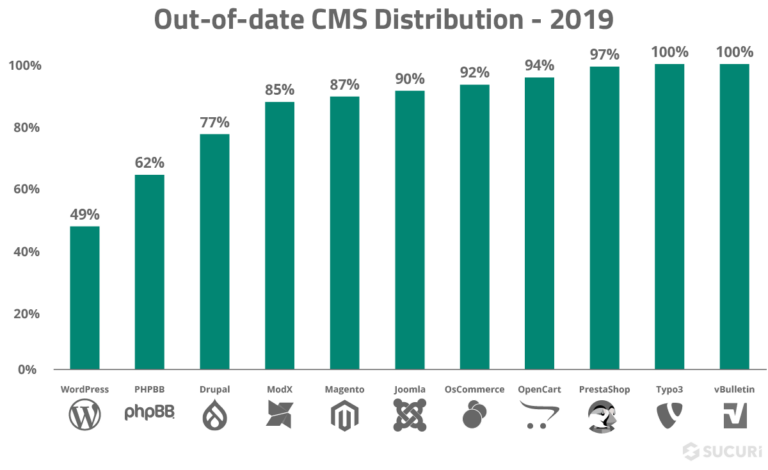
The question is, why aren’t we updating their software on time? Why is this still such a huge problem today?
There are some possibilities, such as:
- Webmasters/developers cannot keep up with the pace of the updates; after all, updating properly takes time.
- Legacy code won’t work on newer versions of its dependencies.
- Webmasters are scared that something will break on their website.
- Webmasters don’t have the expertise to properly apply the update.
This might sound dramatic, but every time you disregard an update warning you might be allowing a now known vulnerability to survive in your system. Trust us, cybercriminals are quick to investigate software and changelogs.
Whatever the reason for running out-of-date software on your web application, you can’t leave it unprotected. Both Sucuri and OWASP recommend virtual patching for the cases where patching is not possible.
Virtual patching affords websites that are outdated (or with known vulnerabilities) to be protected from attacks by preventing the exploitation of these vulnerabilities on the fly. This is usually done by a firewall and an intrusion detection system (IDS).
Vulnerable Applications
Vulnerable applications are usually outdated, according to OWASP guidelines, if:
- You do not know the versions of all components you use (both client-side and server-side). This includes components you directly use as well as nested dependencies.
- The software is vulnerable, unsupported, or out of date. This includes the OS, web/application server, database management system (DBMS), applications, APIs and all components, runtime environments, and libraries.
- You do not fix or upgrade the underlying platform, frameworks, and dependencies in a risk-based, timely fashion. This commonly happens in environments when patching is a monthly or quarterly task under change control, which leaves organizations open to many days or months of unnecessary exposure to fixed vulnerabilities.
- The software developers do not test the compatibility of updated, upgraded, or patched libraries.
- You do not secure the components’ configurations.
You can subscribe to our security blog feed to be on top of security issues caused by vulnerable applications.
How to Avoid Using Components with Known Vulnerabilities
Some of the ways to prevent the use of vulnerable components are:
- Remove all unnecessary dependencies.
- Keep an inventory of all your components on the client-side and server-side.
- Monitor sources like Common Vulnerabilities and Disclosures (CVE) and National Vulnerability Database (NVD) for vulnerabilities in the components.
- Scan your website with a security testing tool such as WPScan
- Obtain components only from official sources.
- Delete components not actively maintained.
- Use virtual patching with the help of a Website Application Firewall.
7
Identification and Authentication Failures
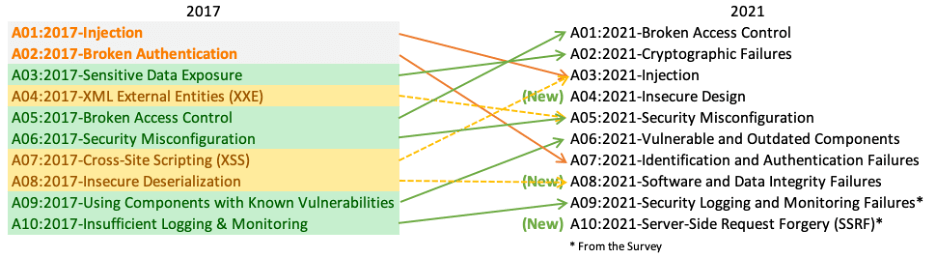
Previously number two on the OWASP list, “broken authentication” has been renamed to this and now ranked at number seven. A broken authentication vulnerability can allow an attacker to use manual and/or automatic methods to try to gain control over any account they want in a system – or even worse – to gain complete control over the system.
Websites with broken authentication vulnerabilities are very common on the web. Broken authentication usually refers to logic issues that occur on the application authentication’s mechanism, like bad session management prone to username enumeration – when a malicious actor uses brute-force techniques to either guess or confirm valid users in a system.
To minimize authentication failure risks avoid leaving the login page for admins publicly accessible to all visitors of the website:
- /administrator on Joomla!
- /wp-admin/ on WordPress
- /index.php/admin on Magento
- /user/login on Drupal.
Brute force username/password combinations against those pages.
Types of Authentication Failure Vulnerabilities
According to the OWASP Top 10, these vulnerabilities can come in many forms. A web application contains a broken authentication vulnerability if it:
- Permits automated attacks such as credential stuffing, where the attacker has a list of valid usernames and passwords.
- Permits brute force or other automated attacks.
- Permits default, weak, or well-known passwords, such as”Password1″ or “admin/admin.″
- Uses weak or ineffective credential recovery and forgot-password processes, such as “knowledge-based answers,” which cannot be made safe.
- Uses plain text, encrypted, or weakly hashed passwords.
- Has missing or ineffective multi-factor authentication (MFA).
- Exposes session IDs in the URL (e.g., URL rewriting).
- Does not rotate session IDs after successful login.
- Does not properly invalidate session IDs. User sessions or authentication tokens (particularly single sign-on (SSO) tokens) aren’t properly invalidated during logout or a period of inactivity.
Writing insecure software results in most of these vulnerabilities. They can be attributed to many factors such as lack of experience from the developers. It can also be the consequence of more institutionalized failures such as lack of security requirements or organizations rushing software releases, in other words, choosing working software over secure software.
How do you prevent authentication failures?
In order to avoid authentication failure make sure the developers apply to the best practices of website security. Support them by providing access to external security audits and enough time to properly test the code before deploying to production.
OWASP’s technical recommendations are the following:
- Where possible, implement multi-factor authentication to prevent automated, credential stuffing, brute force, and stolen credential reuse attacks.
- Do not ship or deploy with any default credentials, particularly for admin users.
- Implement weak-password checks, such as testing new or changed passwords against a list of the top 10,000 worst passwords.
- Align password length, complexity and rotation policies with NIST 800-63 B’s guidelines in section 5.1.1 for Memorized Secrets or other modern, evidence-based password policies.
- Ensure registration, credential recovery, and API pathways are hardened against account enumeration attacks by using the same messages for all outcomes.
- Limit or increasingly delay failed login attempts. Log all failures and alert administrators when credential stuffing, brute force, or other attacks are detected.
- Use a server-side, secure, built-in session manager that generates a new random session ID with high entropy after login. Session IDs should not be in the URL. Ids should also be securely stored and invalidated after logout, idle, and absolute timeouts.
8
Software and Data Integrity Failures
Another new addition to the 2021 roster is software and data integrity failures. These failures can take many forms, particularly since as the web evolves it is more and more common to use third party code and services within web applications. These failures can be summarised as follows:
- Usage of code that does not verify integrity of source
- Usage of third party plugins where you do not control the source
- Plugins and extensions from untrusted sources
- The introduction of or potential for compromise or unauthorised access
- Auto-updates assume trust of the source
WordPress website administrators make heavy usage out of the official WordPress repository. Other CMS platforms have similar libraries that are used. Unlike proprietary software platforms these repositories are all open source and the code is publicly accessible and able to be scrutinised. This is a major advantage but not foolproof. Many open source plugins over the last few years have been targeted by attackers after serious vulnerabilities were discovered within them.
It is also unfortunately common for website owners to use hacked or “nulled” plugins/themes on their website. These are almost always coupled with backdoors that will be used to compromise the website environment.
Examples of Integrity Failure
- In 2021, attackers were able to circumvent Microsoft’s verification process and were able to release a digitally signed driver infected with rootkit
- The SolarWinds hack distributed backdoored software to thousands of organisations including US government and hundreds of major corporations
- In 2016 the website of the popular Linux distribution Linux Mint was hacked and the ISO file replaced with backdoored version
How to Prevent Integrity Failure
As our list of examples above indicates, sometimes verifying proper integrity of software is impossible. However, to do our best due diligence the following principles should be adhered to:
- Use software that was digitally signed by a trusted vendor
- Use trusted software repositories, or your own repository
- Verify that your extensions contain no known vulnerabilities
- Verify checksums and file hashes
- Ensure there is a review process for code changes/updates
- Ensure proper access control to ensure data integrity
9
Security Logging & Monitoring Failures
The importance of securing a website cannot be understated. While 100% security is not a realistic goal, there are ways to keep your website monitored on a regular basis. This allows you to take immediate action when something happens.
Not having an efficient logging and monitoring process in place can increase the damage of a website compromise.
Here at Sucuri, we highly recommend that every website is properly monitored. If you need to monitor your server, OSSEC is freely available to help you. OSSEC actively monitors all aspects of system activity with file integrity monitoring, log monitoring, root check, and process monitoring.
Example of Logging and Monitoring Attack Scenarios
According to OWASP, these are some examples of attack scenarios due to insufficient logging and monitoring:
- Scenario #1: An open-source project forum software run by a small team was hacked using a flaw in its software. The attackers managed to wipe out the internal source code repository containing the next version and all of the forum contents. Although the source could be recovered, the lack of monitoring, logging, or alerting led to a far worse breach. The forum software project is no longer active as a result of this issue.
- Scenario #2: An attacker scans for users with a common password. They can take over all accounts with this password. For all other users, this scan leaves only one false login behind. After some days, this may be repeated with a different password.
- Scenario #3: A major U.S. retailer reportedly had an internal malware analysis sandbox analyzing attachments. The sandbox software had detected potentially unwanted software, but no one responded to this detection. The sandbox had been producing warnings for some time before detecting the breach due to fraudulent card transactions by an external bank.
How to Have Efficient Website Monitoring
Keeping audit logs give visibility to suspicious changes to your website. An audit log is a document that records the events in a website so you can spot anomalies and confirm with the person in charge that the account hasn’t been compromised.
Whatever the reason for running out-of-date software on your web application, you can’t leave it unprotected. Both Sucuri and OWASP recommend virtual patching for the cases where patching is not possible.
We know that it may be hard for some users to perform audit logs manually. If you have a WordPress website, you can use our free WordPress Security Plugin to help you with your audit logs. The plugin can be downloaded from the official WordPress repository.
10
Server-Side Request Forgery
OWASP resource:
SSRF flaws occur whenever a web application is fetching a remote resource without validating the user-supplied URL. It allows an attacker to coerce the application to send a crafted request to an unexpected destination, even when protected by a firewall, VPN, or another type of network access control list (ACL).
As cloud services increase in usage and popularity as well as their complexity, the prevalence and risk of SSRF attacks increase too. As cloud services increase in usage and popularity as well as their complexity, the prevalence and risk of SSRF attacks increase too.
How to Prevent SSRF in Web Applications
- Sanitize all user input
- Use a positive allow list rather than a punitive block list
- Do not send raw responses to users/clients
- Disable unencrypted (HTTP) redirections
Example Attack Scenarios
Attackers can use SSRF to attack systems protected behind web application firewalls, firewalls, or network ACLs, using scenarios such as:
Scenario #1 – Port scan internal servers:
If the network architecture is unsegmented, attackers can map out internal networks and determine if ports are open or closed on internal servers from connection results or elapsed time to connect or reject SSRF payload connections.
Scenario #2 – Sensitive data exposure:
Attackers can access local files such as or internal services to gain sensitive information such as file:///etc/passwd and https://localhost:28017/.
Scenario #3 – Access metadata storage of cloud services:
Most cloud providers have metadata storage such as https://169.254.169.254/. An attacker can read the metadata to gain sensitive information.
Scenario #4 – Compromise internal services:
The attacker can abuse internal services to conduct further attacks such as Remote Code Execution (RCE) or Denial of Service (DoS).
Conclusion
Since 2001, OWASP has been compiling research from over 32,000 volunteers world-wide to educate you on the most dangerous risks facing your website. The change in order and the introduction on new categories has marked a change in the threatscape of the internet. These risks and the strategies provided to mitigate them will put your website security ahead of the curve and out of hackers’ reach.